


THINKWARE CONNECTED
2.712.00 Reviews
App Specs
- Version
- 1.0.9
- Updated On
- License
- Free
- Downloads
- 10,000+
- Developer
- Thinkware Connected
- Categories
- Auto & Vehicles
- Platform
- Android
Screenshots
 Analysis by AppCompare
I think THINKWARE CONNECTED makes the most sense when a dashcam is part of how you look after a car, rather than just a device that records the road. It is a free Auto & Vehicles app from Thinkware Connected, built around linking a compatible THINKWARE camera with a phone through 4G LTE connectivity. That connection can make everyday checks and alerts more convenient, but it also means the app is not a general-purpose driving tool: its value depends on owning the right camera and having a use for connected monitoring.
My main question when assessing a connected dashcam app is whether it helps with a real moment of uncertainty. If I have lent the car to someone, left it parked somewhere unfamiliar, or need to know whether a vehicle has experienced an impact, remote access can be more useful than another map or trip log. The idea is practical, though it works best when I treat the phone as a way to check in—not as a replacement for paying attention to the road or inspecting the camera itself.
Getting Started with THINKWARE CONNECTED
First things first, downloading the app was a breeze. It’s available for both Android and iOS, so you can easily find it on your respective app store. Once installed, setting up was pretty straightforward too. The app guides you through connecting your THINKWARE dashcam to your phone, and I found the instructions to be quite user-friendly. Within minutes, I had my dashcam synced and ready to go.
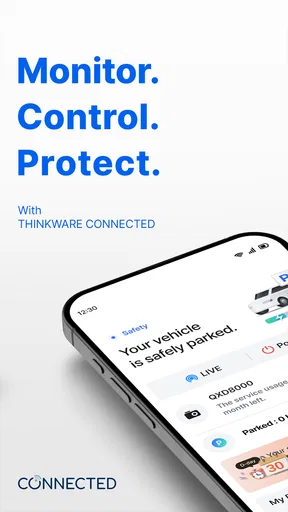
The interface of THINKWARE CONNECTED is clean and intuitive. The main dashboard provides easy access to all the key features. It’s not cluttered with unnecessary elements, which is something I really appreciate. I could quickly navigate through the app without feeling overwhelmed.
Readability and Everyday Navigation
A dashboard that keeps the main controls easy to find matters more here than visual polish. People often open a connected-camera app briefly, perhaps to check the car’s status or review an event, then close it again. A straightforward layout reduces the chance of having to search around while parked and in a hurry. I would still make any setup changes before setting off; simple navigation is not a reason to use a phone while driving.
For someone who prefers larger text, high contrast, or fewer on-screen choices, a clean interface may feel less demanding than a feature-heavy vehicle app. That does not guarantee every screen will suit every person, though. I’d recommend checking the display on your own phone during setup, especially if you rely on magnification or have difficulty distinguishing small controls. A companion app can only be comfortable if its labels and touch targets work for the person using it.
Features That Stand Out
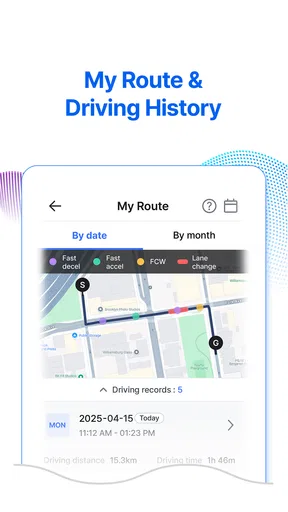
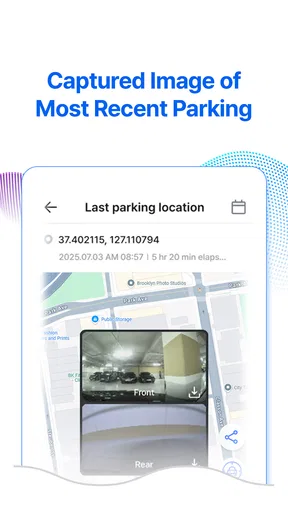
One of the coolest features is the real-time location tracking. I could see where my car was at any given moment, which gave me peace of mind, especially when lending my car to family members. The app also offers geofencing notifications. So, if my car leaves a predefined area, I get an alert. It’s like having a personal security guard for my vehicle!
Worth Reading Before You Choose

Flipboard Shows What News Apps Must Do Beyond the Feed

Switching to Android Auto Means Rethinking Your Driving Routine

Google Calendar Makes a Crowded Week Easier to Manage

Ludo King Makes the Most of the Minutes Between Plans

Baby Panda World Brings Quick Play to Modern Phones, but Its Game Library Feels Busy

ESPN’s Live Game View Makes Following Close Games Easier
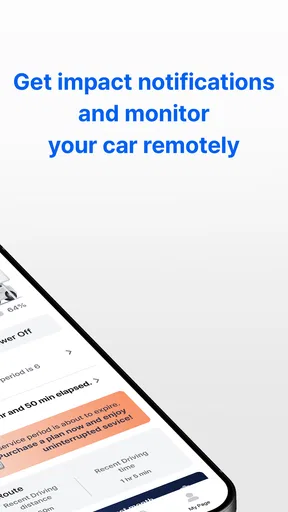
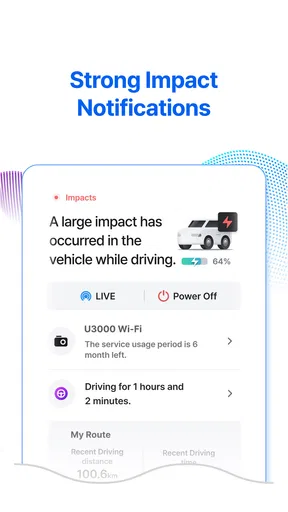
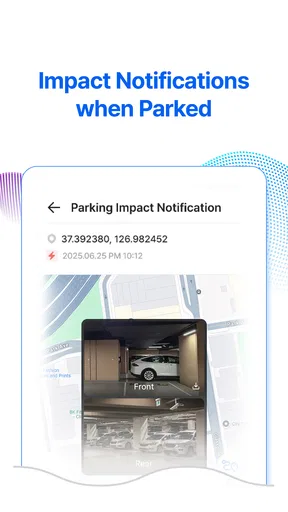
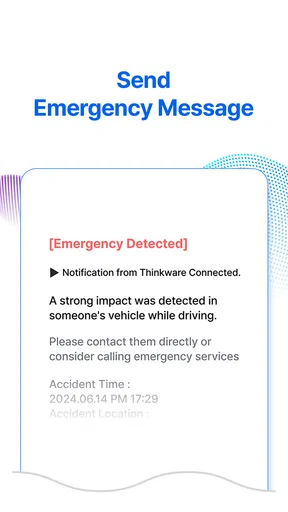
Another noteworthy feature is the driving impact notifications. If there’s a sudden impact or collision detected, the app sends an instant alert. This is particularly useful in case of accidents, allowing me to respond quickly if needed.
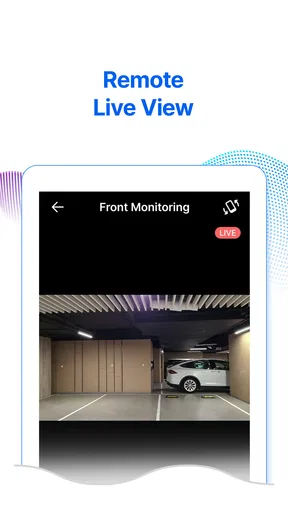
And let’s not forget the remote control capabilities. From starting and stopping recordings to adjusting camera settings, the app gives me full control over my dashcam. This is perfect for those moments when I remember I needed to tweak a setting but am nowhere near my car.
Motor and Sensory Considerations
Remote controls can be a genuine convenience for people who find it difficult to reach or operate the camera directly. Changing a setting through a phone may be easier than leaning into a vehicle or handling a small physical control. It also gives a driver the option to make adjustments while safely parked, rather than trying to interact with equipment in a cramped position.
Alerts can help when someone cannot keep checking a screen, but notifications are only useful if they are noticeable and understandable to that person. Someone who does not hear phone sounds may need to rely on visual alerts; someone who finds repeated notifications distracting may prefer to limit how often they check the app. I would test how alerts appear on my own device and build a calm routine around them instead of assuming every event will be obvious.
There is a trade-off with sensory load, too. Location updates, boundary alerts, and impact notifications can create reassurance, but frequent prompts can become stressful if a car is shared or regularly moved. A practical approach is to use alerts for the situations that matter—such as a vehicle left in a defined parking area—rather than treating every notification as something that needs an immediate response.
Situational Access: When the Connection Helps
Picture a normal errand day: I leave the car parked while visiting a busy shopping area, then later lend it to a relative who needs to make another stop. A location check can answer the basic question of where the vehicle is, while a boundary alert may be useful if I have set a zone for that particular situation. If an impact notification arrives, I can decide whether to contact the driver or inspect the vehicle when it is safe. These tools are most helpful as prompts for a sensible next step, not as proof of exactly what happened.
The app may also suit households where more than one person takes responsibility for a vehicle. Instead of asking someone to remember every detail of a drive, a connected camera can make certain events easier to notice. Still, I would agree in advance on who is monitoring alerts and when. Without that small bit of coordination, shared access can lead to duplicate checking or confusion about who should respond.
For a person who parks in a garage and rarely lends the car, the remote location features may be less compelling. A standard dashcam that records locally could be enough if the main goal is simply to capture footage. By contrast, someone who regularly leaves a car in unfamiliar places may appreciate being able to check its location from a phone. That difference in routine is a better guide to value than the number of features on a screen.
How It Compares with Ordinary Dashcam Apps
Many dashcam companion apps focus on connecting to a camera nearby, changing settings, and reviewing recordings when the driver is beside the vehicle. THINKWARE CONNECTED is aimed more at remote awareness through its 4G LTE connection, so its appeal is the possibility of checking or receiving information without standing next to the dashcam. That is a meaningful distinction for people who need to keep an eye on a parked or shared vehicle.
The trade-off is that remote connectivity adds another layer to manage. A simpler local-only camera app can be the better choice if I mostly want to transfer a clip after a drive and do not need ongoing vehicle updates. Someone choosing between the approaches should ask whether remote checks would change what they actually do. If the answer is no, a connected setup may add complexity without enough day-to-day benefit.
Compatibility is also central: this is designed for THINKWARE dashcams, not as a universal control panel for any camera. Before choosing the app, I would make sure the particular dashcam supports the connected functions I want and that the phone can complete the pairing process. A smooth first setup is encouraging, but it is still worth checking that the camera and connection remain dependable in the places where the car is usually parked.
User Experience and Performance
Throughout my time using THINKWARE CONNECTED, I found the performance to be quite reliable. The app runs smoothly, and I didn’t encounter any crashes or significant lags. The notifications are prompt, and the GPS tracking is impressively accurate. Even the video playback quality is top-notch, making it easy to review footage when necessary.
However, I did notice that the app can be a bit of a battery drainer, especially if you have multiple features running simultaneously in the background. It’s something to keep in mind if you’re planning a long drive and want to keep your phone charged.
That battery cost is worth considering before turning on every available background function. If I am travelling for hours, I would keep a charger available and decide which connected tools I actually need during the trip. If I only want to review a recording later, leaving constant monitoring active may not be worthwhile. This is a useful distinction for anyone who depends on a phone throughout the day and cannot easily recharge it.
Another sensible habit is to review a recording while stationary, with enough time to find the relevant clip, rather than assuming an alert will tell the whole story. A notification can direct my attention to an event, but reviewing footage is a separate step. Keeping those two tasks distinct makes the app easier to use responsibly and avoids turning a quick alert into a distraction on the road.
Remaining Barriers and Who Should Skip It
The biggest barrier is the hardware dependency. Without a compatible THINKWARE dashcam, the app has little reason to be part of a person’s routine. It is also not the best fit for someone who wants only basic phone navigation, hands-free calls, or a generic vehicle log; those needs are better served by apps built specifically for them. Its connected camera role is the point, not a substitute for every driving app.
The average rating of 2.7 across roughly 200 ratings suggests that prospective users should approach it with realistic expectations rather than assuming every setup will be effortless. That score does not explain any individual experience, but it is a reason to test the pairing and the features that matter soon after installation. The app has attracted over 10,000 installs, yet popularity alone cannot tell me whether a particular camera, phone, and parking routine will work well together.
THINKWARE CONNECTED is free to download and rated for Everyone. It is currently version 1.0.9, and in-app purchases range from $1.99 to $89.00 per item. I would check what an optional purchase covers before paying, and decide whether it supports a feature I will genuinely use. The app was released on June 13, 2022, and supports Android 7.0 or later, which is useful to keep in mind when checking an older phone.
For accessibility, I would not assume that a connection automatically makes the whole system accessible. A user may still need to handle phone setup, interpret alerts, and manage a camera in the vehicle. If touch interaction, small text, sound notifications, or frequent phone checks are difficult, I would try the key tasks with the actual device before relying on them. The safest workflow is one that a person can use comfortably while parked and does not demand attention behind the wheel.
Is It Worth the Download?
Overall, I’d say THINKWARE CONNECTED is a solid companion for anyone with a THINKWARE dashcam. The app enhances the dashcam experience by providing added layers of security and control. Whether you’re a tech enthusiast or someone just looking to keep better tabs on your vehicle, there’s a lot to love here.
While it’s not without its minor hiccups, such as battery usage, the pros definitely outweigh the cons. The peace of mind and convenience this app offers make it a worthwhile addition to your digital toolkit. So, if you’re on the fence, I’d suggest giving it a shot. You might just find it to be exactly what you’ve been missing.
My recommendation is strongest for a driver who owns a compatible THINKWARE camera, parks away from home, or shares a vehicle and has a clear reason to want remote alerts. I would hesitate if I rarely check on my car, prefer a basic local recording workflow, or find background notifications and phone battery use more trouble than they are worth. In those cases, a simpler dashcam arrangement may be easier to live with.
From an inclusive-use perspective, the app’s most promising quality is that it can move some camera tasks onto a phone, which may suit people who find direct interaction with vehicle equipment awkward. Its limits are just as important: phone controls and alerts still require a usable screen and a comfortable way to notice information. I would judge it by trying the few tasks I expect to use most, such as pairing, checking location, and responding to an alert, rather than by relying on a general impression of the interface.
Ready to take your driving experience to the next level? You can download THINKWARE CONNECTED from your device’s app store and start exploring its features today.
Pros
- User-friendly interface for easy navigation.
- Real-time GPS tracking enhances vehicle security.
- Seamless integration with Thinkware dash cams.
- Customizable alerts for various vehicle activities.
- Secure cloud storage for important footage.
Cons
- Limited compatibility with non-Thinkware devices.
- Subscription required for advanced features.
- Occasional app connectivity issues.
- Battery usage is relatively high.
- No offline access to cloud-stored videos.
FAQs for THINKWARE CONNECTED
What is THINKWARE CONNECTED and what does it offer?
THINKWARE CONNECTED is a feature-rich app designed to enhance your driving experience by connecting your THINKWARE dash cam to your smartphone. It offers real-time notifications, GPS tracking, and remote access to recorded footage. This app provides peace of mind by allowing users to monitor their vehicles from anywhere, ensuring safety and convenience.
Is THINKWARE CONNECTED compatible with all THINKWARE dash cams?
THINKWARE CONNECTED is compatible with specific models of THINKWARE dash cams. Before downloading, check the app’s compatibility list on the official website or app store to ensure your dash cam model is supported. This will help you avoid any connectivity issues and ensure a seamless experience.
How user-friendly is the THINKWARE CONNECTED app?
The THINKWARE CONNECTED app boasts a user-friendly interface designed for ease of use. It features intuitive navigation and straightforward controls, making it accessible for users of all tech levels. The app includes clear instructions and support, which simplifies the setup and operation process for managing your dash cam remotely.
What are the key benefits of using THINKWARE CONNECTED?
The key benefits of THINKWARE CONNECTED include enhanced security through real-time alerts and GPS tracking, convenience with remote access to your dash cam footage, and peace of mind knowing you can monitor your vehicle from anywhere. These features make it a valuable tool for both personal and commercial vehicle use.
Are there any costs associated with using THINKWARE CONNECTED?
While downloading THINKWARE CONNECTED may be free, some features might require a subscription or additional payment. It’s important to review the app’s details in the app store or the THINKWARE website for any in-app purchase information. This ensures users are informed about potential costs before fully committing to the app.


